Breakdown
How to Track Home Renovation Costs: 6 Ways Compared
By Ruslan Akberov · · 6 min read

When I started my first home renovation, I ran into a question: how do I keep track of everything? I needed to manage the budget—how much I’d set aside, how much I’d already spent, and whether I’d have enough to finish. I also needed to put together a cost estimate, track materials and prices, and remember what I’d agreed on with each contractor, which jobs were coming up, and how much they would cost.
I wanted everything in one place so I could check what had been paid for, which materials I still needed to buy, and what expenses were coming next.
I started looking at ways to organize it all: a paper notebook, notes on my phone, a spreadsheet, a group chat, or a task board. Here’s a look at each option, what makes it useful, and where it can get tricky.
1. A Paper Notebook
The simplest approach is to get a notebook and write down everything related to the renovation: expenses, room measurements, materials, and agreements with contractors. You can dedicate a few pages to each room and organize your cost estimate as a table.
Pros
- You can start right away without learning any software.
- It’s easy to sketch layouts, draw diagrams, and jot down measurements.
- No internet connection or charging required.
Cons
- You have to calculate totals by hand and update them whenever something changes.
- Finding a specific detail gets harder as the notebook fills up.
- Sharing the work of keeping records is inconvenient.
- You’ll need a separate system for receipts and photos.
- If you lose the notebook, you could lose all your records.
A notebook can work well for a small renovation, especially if you prefer writing by hand. But as purchases and tasks pile up, keeping it organized gets harder.
2. Notes on Your Phone
You can create separate notes for the kitchen, bathroom, and living room, each with a list of upcoming work, purchases, and expenses. Depending on the app, you can also attach photos, scanned receipts, and links to materials.
Pros
- Your phone is usually nearby, so you can record a purchase or agreement right away.
- It’s easy to make checklists and mark items as done.
- You can search your notes.
- Some apps let you share notes and edit them together.
Cons
- A basic list won’t show you how much money is left.
- You have to decide how to organize your entries and stick to that system.
- Purchases, tasks, and agreements can get mixed together in one long note.
- Comparing estimated and actual costs can be awkward.
Notes are great for capturing information quickly. To keep them useful, decide early on where you’ll track tasks, record expenses, and mark payments.
3. Using Excel or Google Sheets to Track Renovation Costs
A spreadsheet lets you build a detailed cost estimate: list materials and labor, enter quantities and prices, and compare estimated costs with actual spending. You can also track payments you’ve made and amounts you still owe.
You could use a separate sheet for each room and another for the overall totals.
Pros
- Formulas calculate totals and your remaining budget automatically.
- You can compare estimated and actual costs.
- You can customize the layout to fit your renovation.
- It’s easy to filter expenses by room, category, or payment status.
- With shared access, more than one person can keep the records up to date.
Cons
- Building the spreadsheet and setting up formulas takes time.
- You can accidentally break a formula while editing.
- A large spreadsheet can be difficult to update on your phone.
- You’ll need to figure out where to store photos, receipts, and detailed agreements, and how to link them to the spreadsheet.
You can set up a spreadsheet almost any way you like. But building it is only half the job: you still need to record purchases and payments regularly to keep the numbers accurate.
4. A Chat With Yourself, Your Partner, or Your Contractors
A lot of renovation information ends up in messages anyway: a contractor sends a quote, you share a receipt, save a link to some tile, or discuss a delivery. Creating a dedicated renovation chat gives you a place to collect it all.
Pros
- You can save information as you discuss it.
- It’s easy to share photos, documents, links, and voice messages.
- Everyone in the chat can review agreements and clarify details.
- The conversation history is easy to access.
Cons
- Important messages quickly get buried.
- If plans change several times, it can be hard to tell which agreement is current.
- There’s no clear overview of expenses, purchases, or completed work.
- Finding details can be difficult, especially if they’re in a voice message.
A chat is useful for communication, but using it for tracking takes extra effort. You’ll need to periodically summarize what was agreed on, how much it costs, and what’s been paid. Otherwise, you may find yourself scrolling through old messages before every purchase or payment.
5. A Task Board—Online or on the Wall
You can break the renovation into cards such as “Order tile,” “Confirm the electrical plan,” and “Install doors.” Move them between columns labeled “To Do,” “In Progress,” and “Done.” Each card can include a deadline, the person responsible, and details about the job.
You can use a digital board or a physical board with sticky notes.
Pros
- You can see what’s coming up and what’s already finished.
- Large jobs can be broken into smaller steps.
- Deadlines and responsibilities are easy to track.
- You can flag tasks that are waiting on materials or a decision from a contractor.
Cons
- You need to update the cards regularly so the board reflects what’s actually happening.
- Creating a card for every small purchase can clutter the board.
- You may need a separate spreadsheet to track material quantities, payments, and total costs.
- If one job depends on another, you’ll need a way to show that connection.
A task board helps you follow the progress of a renovation, especially when several people are involved. A detailed cost estimate, though, will probably be easier to manage elsewhere.
6. Using a Special App
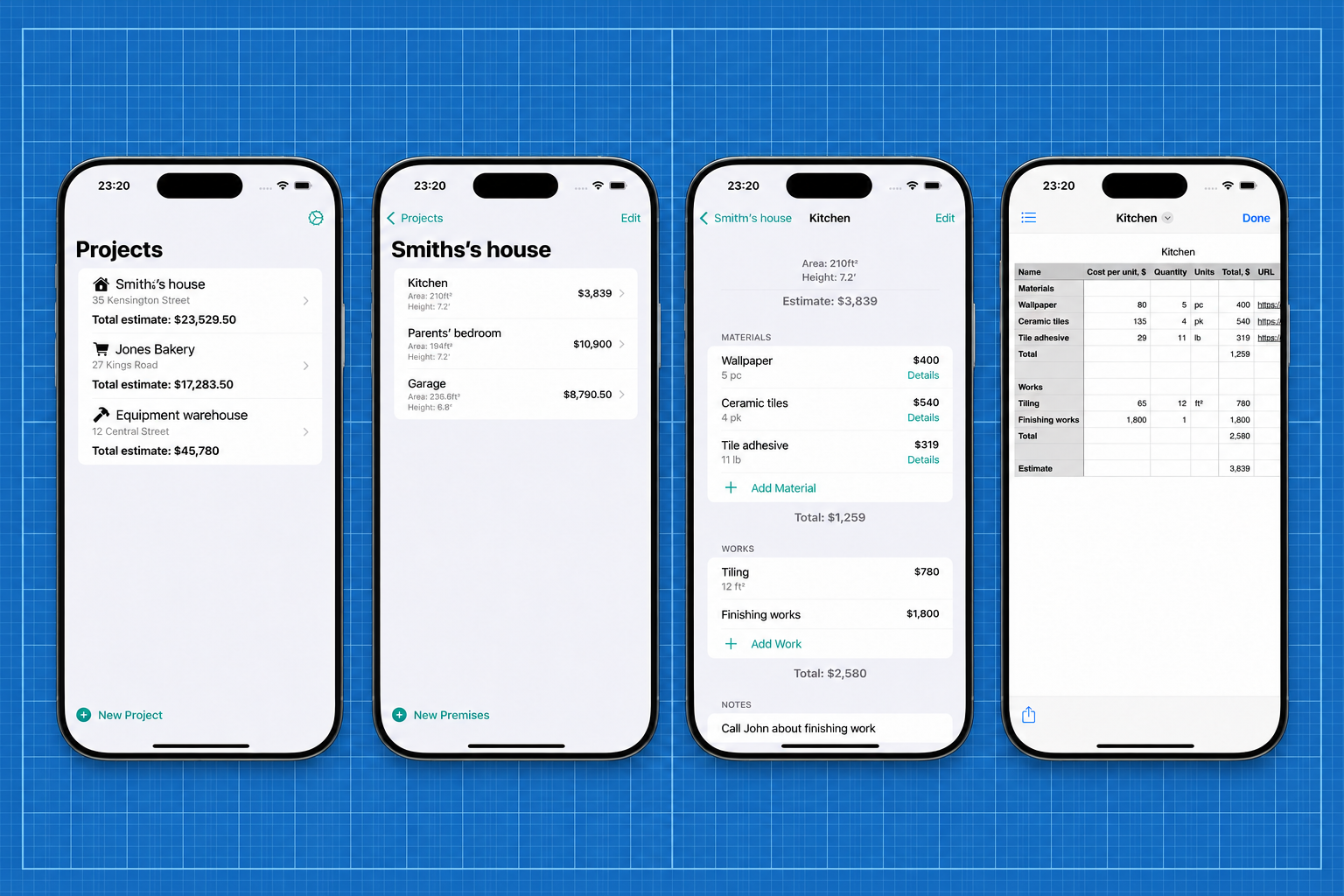
I also looked at renovation apps in the App Store, but I couldn’t find one that worked the way I wanted. I wanted to organize everything by room, with materials and labor included in each room’s cost estimate.
So I decided to build my own app: Repair Budget Planner.
You start by creating a project, such as an apartment or a house. Then you add rooms: the kitchen, living room, bathroom, and so on. Each room has its own cost estimate, split into materials and labor.
Pros
- You don’t have to build a tracking system from scratch.
- Materials and labor are assigned to a specific room.
- You can work on the kitchen, bathroom, or another room’s estimate separately.
- All entries follow the same structure.
- You can export an estimate as a CSV file and share it with your general contractor or other contractors.
Cons
- You need to learn how the app works and enter information regularly.
- Shared access and photo attachments aren’t currently available.
For my renovation, organizing everything into projects, rooms, and estimates worked best. That’s the structure I built the app around.
Which Option Should You Choose?
There’s no single right way to track a renovation. Some people are comfortable with a notebook, others prefer a detailed spreadsheet, and some find an app easier to use.
You can mix and match these methods, too: discuss work in a chat, save ideas in your notes, and keep your cost estimates in a spreadsheet or app. What matters is knowing where to find up-to-date information and choosing a system you can keep using without it becoming another chore.